
MC at Home triallist sign-up
 The Maximum Classics course has been taught in UK schools since 2016, with over 400 schools teaching the materials. But we know that not all students learn in traditional school settings. For that reason, we’re currently developing Maximum Classics at Home. This course is tailored for individual or small group learners with video lessons, printable workbooks, interactive quizzes and progress tracking. As well as improving English literacy, the course also provides a solid foundation for the further study of Latin using established 11+ courses.
And this is where you come in. The Maximum Classics for Schools course was developed in collaboration with schools across the UK. We want to engage in the same feedback process from independent learners, i.e. you!
So, what’s involved in helping us trial the course? Here are the steps:
STEP 1: Try Unit 1
There are currently four units of learning for you to trial. You can see them all on the MC at Home units of learning page. Starting with Unit 1, work through as many of the four units as you’d like. If you’re only able to trial Unit 1, that’s great. Just skip straight to Step 3 below 👇🏼.
STEP 2: Apply the 100% discount code (if you want to go further than Unit 1)
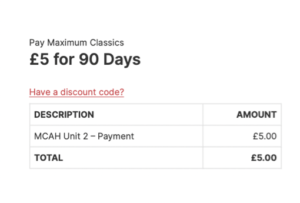
If you go beyond Unit 1 (which is free content), you’ll be asked to create a login and to pay for the unit. Don’t worry, you won’t have to pay! As a triallist, you’ve been set up with a 100% discount code to get access to all the units for free. Simply click on the ‘Have a discount code?’ link and enter the code ‘MCaHTrial25’ into the box.
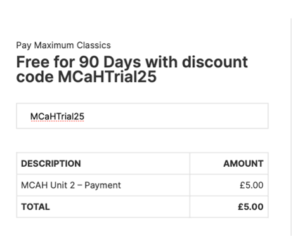
Once you’ve entered the code, you’ll see confirmation that it’s been applied, and that the course is free for 90 days.
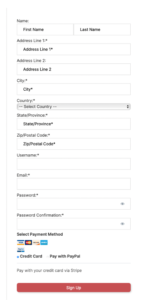
Next, fill in your details (name, address, email), then choose yourself a username and password. Since there is a 100% discount applied, you won’t be asked for any credit card details.
Once you’ve set up a username and password, you can also use the ‘MCaHTrial25’ 100% discount code on Units 3 and 4.
You can access the Units from the course units page or from the All Courses link on the MC navigation panel at the top of every page.
STEP 3.
If you look at the course units page, you’ll see the number of lessons plus an estimate of how long it takes to complete the unit.
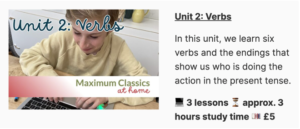
A lesson doesn’t need to be completed in one sitting, but can be split up to suit your schedule. Each unit features an orientation video to help you get started, so it’s vital to watch this before you embark on the lessons.
STEP 4.
 Once you’re ready to give feedback, go to our home trial online survey. It should take you no more than five minutes to fill out.
If you have any questions about the trial, please get in contact.